Role
Product Designer & Solo Dev
Duration
Mar 2025 – Present (12 mo)
Platform
iOS — React Native / Expo
Background
5+ yrs Product Designer (Japan)
12
30+
Languages (EN/JP)
"In Sydney, every café had a proper espresso machine — the coffee culture blew me away. I kept thinking: I want to remember this place, and that one, and track how much I'm actually spending. But no app did all of that."
Personal Itch
Visited Australia and realised there was no single app for finding good food spots, logging visits, and keeping track of what I spent.
Market Gap
Google Maps knows where you've been — but not what you ate or paid. No app combined discovery, visit logging, spending, and a social feed of friends' spots.
Builder's Challenge
I'd never built an app from scratch. I wanted to take a product from 0→1 solo — design, code, and ship — to prove I could own the full cycle.
There's no single app where you can find a great place to eat, record that you went, and see how much you've been spending.
People use Google Maps to discover, a notes app to remember, and nothing to track the cost.
Product Design
UX Research
Frontend Dev
Backend
Solo — End to End
Capability | Google Maps | Yelp / Tabelog | Pintio |
|---|---|---|---|
Discover nearby places | ✅ | ✅ | ✅ |
Record visit history | ⚠️ GPS auto-tracking (Timeline). Passive — knows where, not what you ate or spent. | ⚠️ Manual check-in or review-based. No auto-logging. | ✅ Receipt photo → AI extracts store, items, amount, date. Active, detailed record. |
Spending tracking
(multi-currency) | ❌ | ❌ | ✅ 6 currencies |
Receipt scan → auto log | ❌ | ❌ | ✅ GPT-4 Vision |
Friends’ visit history | ⚠️ Shared lists exist. No automatic visit feed. | ⚠️ Reviews & check-ins visible. Collections shareable. | ✅ Follow-based Automatic feed of friends’ visited places on map. |
Facility filters
(Wi-Fi, power) | ⚠️ Text search only. No structured filter. | ⚠️ Mentioned in reviews. No dedicated filter. | ✅ Dedicated toggles for Wi-Fi, power, category. |
Key insight: Google Maps passively records where you were. Pintio actively records what you experienced and spent. The difference is Timeline vs Journal.
04
Pintio changed direction three times. Each pivot came from hitting a real wall, not from a whiteboard exercise.
1
B2B-First → B2C-First (The Chicken & Egg)
Early 2025 — Marketplace cold-start problem
Before
I started by building for store owners — even shipped a Next.js admin dashboard. But no owner was going to sign up for a platform with zero users.
Insight
Classic chicken-and-egg problem. In a marketplace, demand has to come before supply.
After
Flipped the entire priority to the consumer app. The dashboard wasn't wasted — it's sitting ready for when the user base is there.
2
Official-Only → User-Generated Platform
Sep 2025 — Hitting the scalability wall
Before
Only stores registered by their owners showed up. Getting each one onboarded was slow, and the map felt empty.
Insight
Users kept asking "can I add my own favourite spot?" That was the signal — let them build the database.
After
Anyone can add a store. Quality control built in: a place auto-publishes once 20 unique visitors have logged it.
3
Café-Only → All-Category Food Map
Feb 2026 — Expanding the market
Before
Pintio started as a café-only app. That felt focused, but the addressable market was too small to grow.
Insight
The real value wasn't "cafés" — it was "tracking where you eat and what you spend." The category didn't matter.
After
Opened up to restaurants, bakeries, bars — any food spot. The database architecture handled it with minimal migration.
05
Not every screen was interesting. These three moments show how I think about product design problems.
UX Redesign
Receipt Scan UI Overhaul
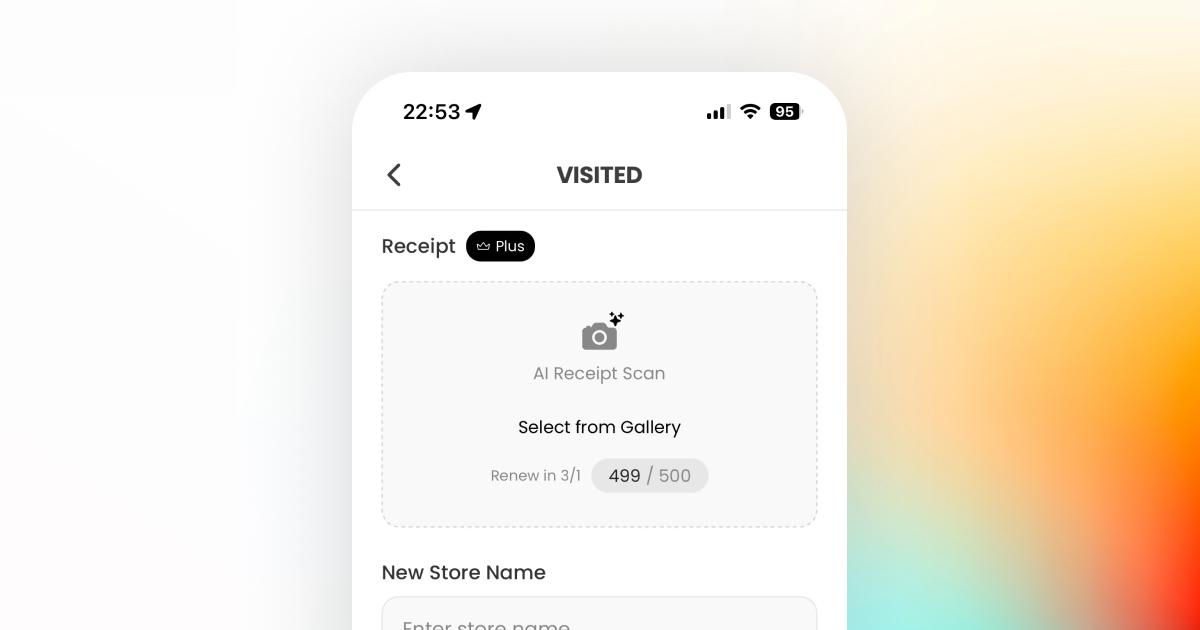
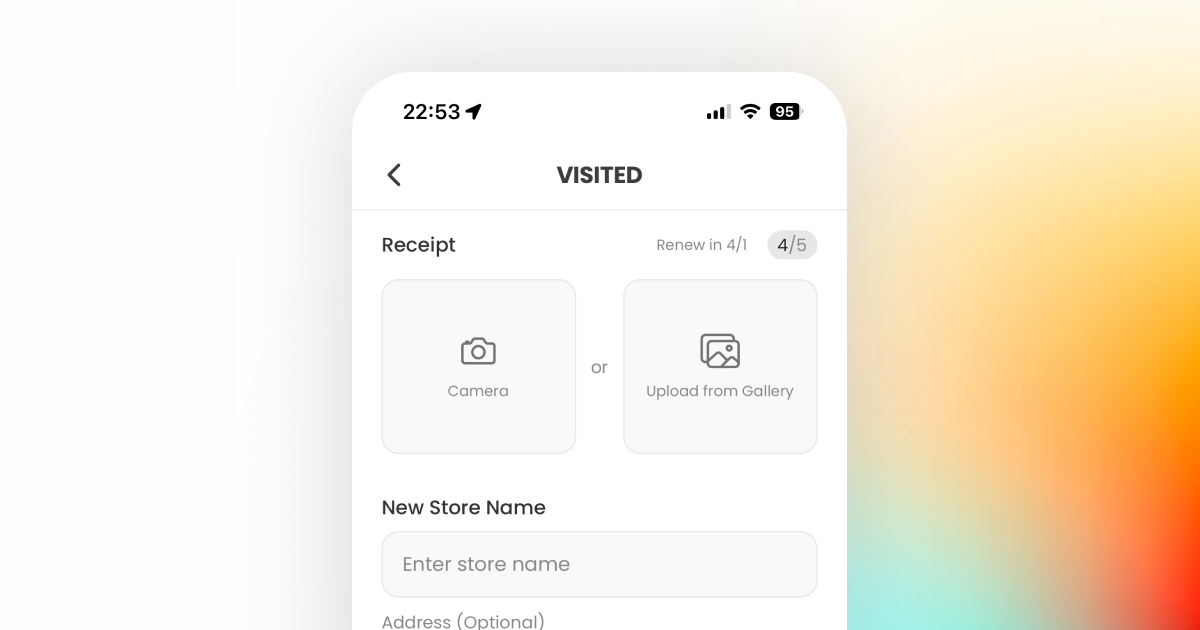
User testing revealed that "Select from Gallery" was invisible. Fixing it introduced a layout constraint I hadn't expected.
Problem
The original design put "AI Receipt Scan" and "Select from Gallery" inside a single box. In testing, users could find the scan button, but when asked to upload from their gallery, they didn't know where to tap. The two actions looked like one.
Decision
First instinct: split them into two separate boxes. But stacking vertically would make an already long form even longer. So I placed them side by side — "Camera" and "Upload from Gallery" as equal-weight options with "or" between them.
Outcome
Both actions are now instantly recognisable. The horizontal layout actually saved vertical space, so the form fields below feel less overwhelming too. No more "where's the gallery option?" confusion.
Before
Flow Redesign
Onboarding Architecture
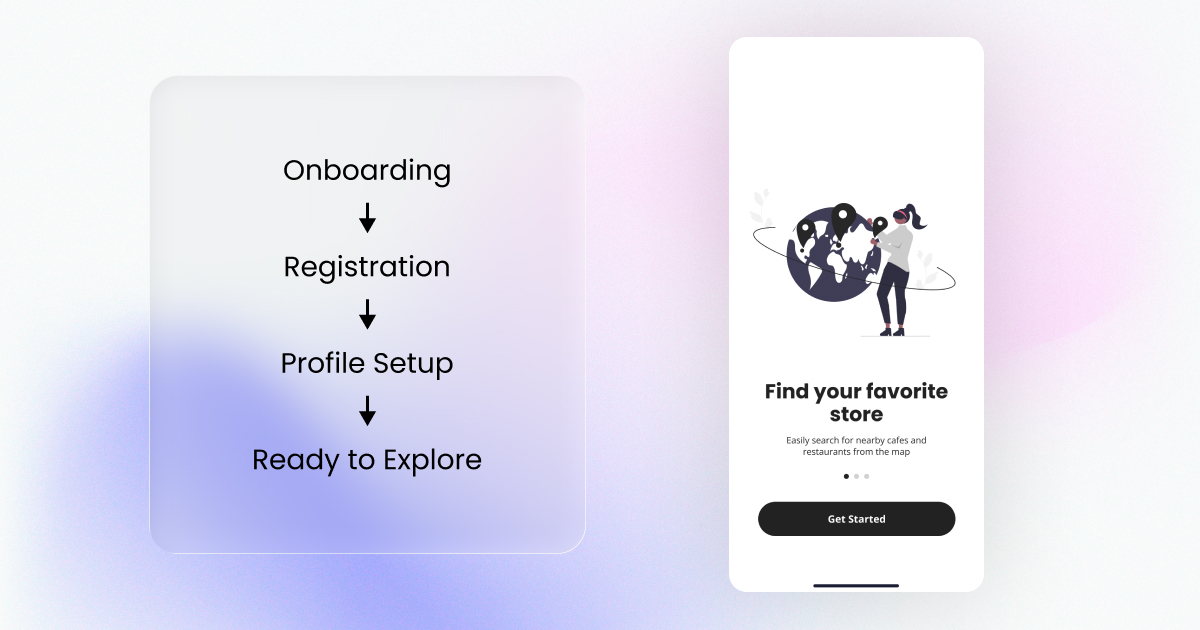
The problem wasn't just too many slides — it was a flow that forced commitment before showing any value.
Problem
The original flow was a straight line: Onboarding → Registration → Profile Setup → Ready to Explore. Every user had to create an account before seeing a single store on the map. No way to just look around first.
Decision
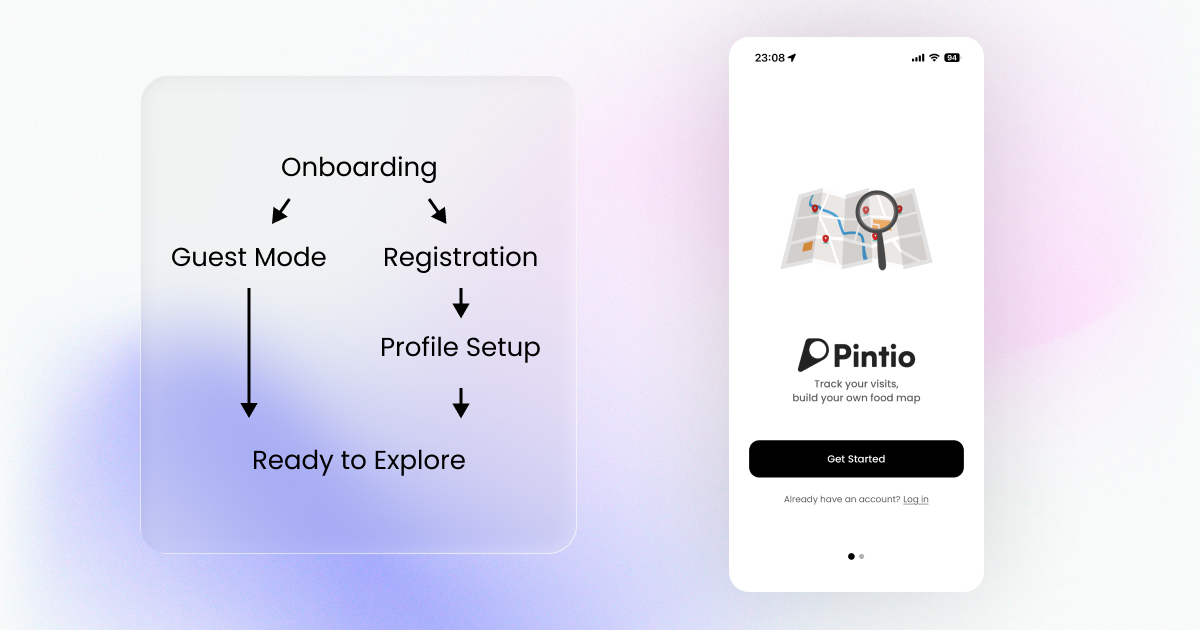
Redesigned the flow with a branch: after a 2-slide intro, users choose Guest Mode (straight to the map) or Registration. Guest mode gives full browsing access — signup happens naturally once they see the value. Also updated the intro copy from "Find your favorite store" to "Track your visits, build your own food map" to reflect the real product proposition.
Outcome
Guest users reach the map in under 10 seconds. Registration is no longer a gate — it's a choice users make after experiencing the app. Mixpanel tracking is in place to compare guest-to-signup conversion rate post-launch.
Before
User Psychology
Reframing Data: Spending vs Visit Count
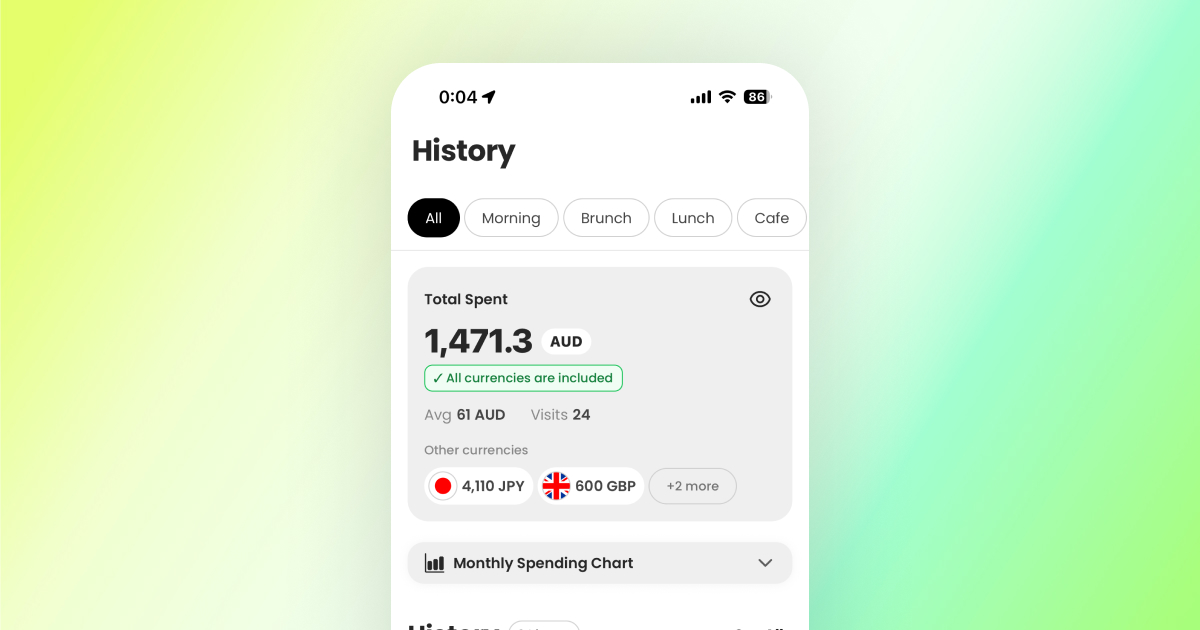
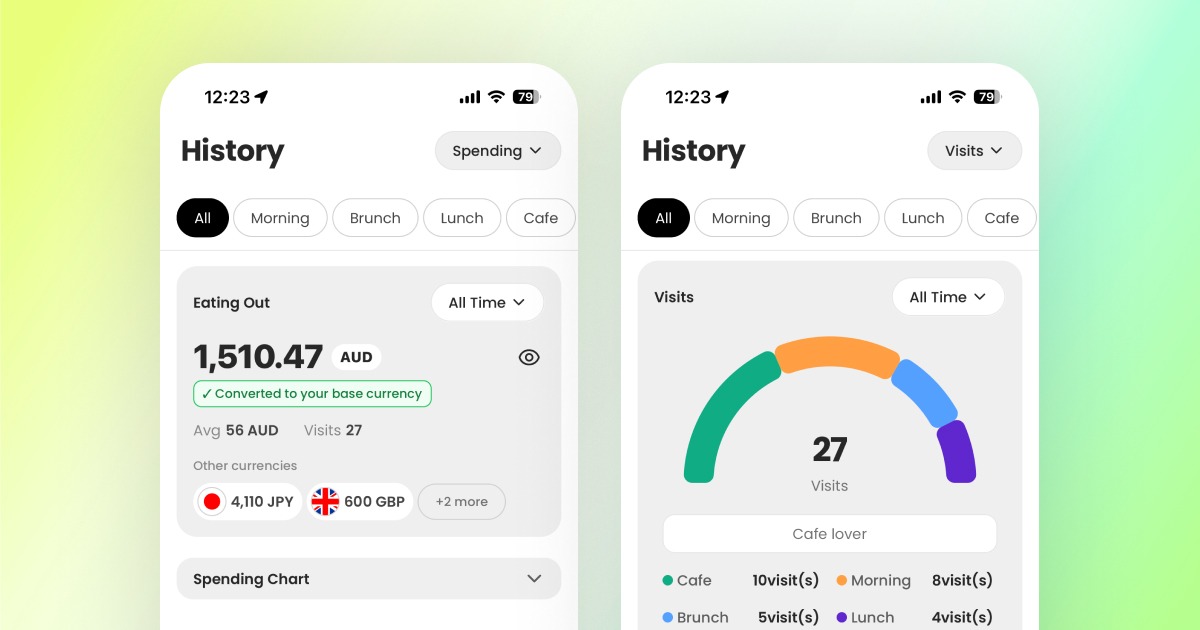
TestFlight revealed something I didn't expect: watching your spending go up made people feel bad about using the app.
Problem
The history screen originally showed cumulative spending front and centre. Receipt scans logged the amount, and the total kept climbing. During testing, users felt guilty seeing the number grow — it turned a fun record into a reminder of how much they'd spent.
Decision
Instead of removing spending data, I added a second view: visit count. Users can toggle between "how much I spent" and "how many places I've been." The visit count reframes the same data as an achievement rather than a cost.
Outcome
The app now serves two mindsets: budget-conscious users who want spending insights, and explorers who want to see their journey grow. Same underlying data, completely different emotional response depending on which view you choose.
Emotional Design
Milestone Celebrations
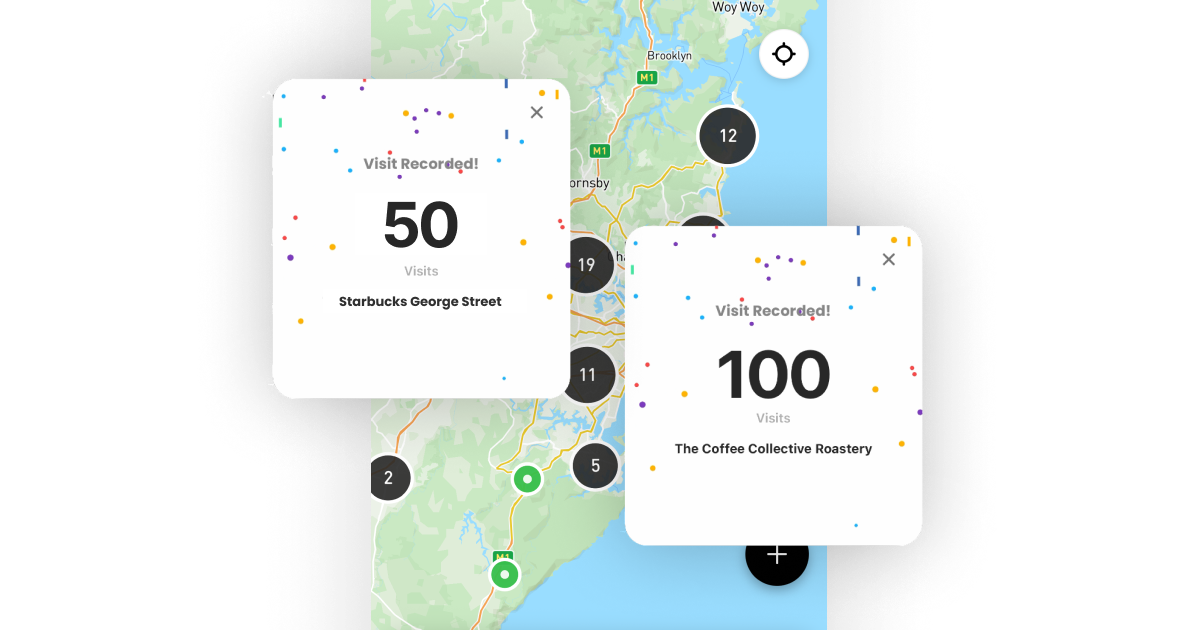
Once visit count existed, I realised: if your map is filling up, that should feel like an achievement — not just a number going up.
Problem
The visit count view solved the negativity problem, but it was still just a passive number. Users could see their places growing on the map, but nothing in the app acknowledged that progress.
Decision
Created two feedback tiers: a subtle toast notification for regular visits (disappears in 2.5s), and a full-screen celebration modal with confetti + haptics at milestones (10, 25, 50, 100…). The key was restraint — over-celebrating kills the effect.
Outcome
The combination works: visit count reframes the data positively, and milestones turn that growing number into moments worth coming back for. Together they support the retention hypothesis — if your map feels like it's building towards something, you keep adding to it.
How I Validated Design Decisions
No research team. No large beta group. Here's what I actually had to work with:
Dogfooding
I used Pintio as my daily café/restaurant tracker. Every friction point I hit — slow loading, awkward tap targets, confusing navigation — went straight into the backlog.
Friend Testers
A small group tried the TestFlight build. I watched their first sessions and noted where they hesitated or got stuck. Small sample, but honest signal.
AI as Design Critic
AI-generated screens gave me something to react to — a "third-party perspective" that was faster than designing from a blank canvas. I'd generate, critique, then refine.
06
My workflow evolved three times in 12 months — each shift made me faster than the last.
Phase 1
Figma + YouTube + Code
Started with initial concepts in Figma, then taught myself React Native from YouTube. Used Claude's chat interface to generate code snippets and learn patterns as I went.
Phase 2
Claude Code Changed Everything
When Claude Code launched mid-project, AI moved from chat into the editor. Coding and debugging happened in real-time conversation. What used to take a day of layout work became an hour.
Result
AI Generates, I Refine
As AI accuracy improved, the workflow flipped: AI produces screens, I critique and polish. Design intent and code stay in sync because one person owns both. 30+ screens shipped solo.
07
Experience > Explanation
The original onboarding forced registration before users saw any value. I added a guest mode branch so people could explore first. Don't explain the product — let them experience it.
Solve the Cold Start First
Building the Next.js dashboard "too early" was the most useful mistake I made. It taught me marketplace sequencing the hard way: users before supply. Always.
Privacy as Default
Adding social features without guardrails is a trust killer. I defaulted to user control everywhere — public/private toggles, search visibility, follow approvals.
08
This case study covers V1. The product — and the learning — is just getting started.
First Hypothesis to Test Post-Launch
If recording visits is valuable on its own, users will come back weekly without being prompted.
Measuring: Week 1 → Week 4 retention. If recording alone isn't enough, the next lever is social — showing users where their friends have been.
On the roadmap: Melbourne & Sydney launch. Activating the store owner dashboard (Next.js — already built). Iterating with Mixpanel data from real users.
I'm looking for a Product Designer role where I can bring this kind of end-to-end ownership to a team.